PaperPull

Your statements and receipts, as PDFs. Then as spreadsheets.

Bank statements, card statements, utility bills, and every Amazon, Target and Walmart receipt you ever got, saved as PDFs on your own computer, then read into one spreadsheet. Read-only, open source, no cloud.

Free, and nothing is for sale here. No account, no subscription, no upsell. It does cost money to make, an Apple developer membership every year, a Store account, and evenings on every provider, so if PaperPull saves you time, a coffee or the Store edition says thanks. Both are optional and change nothing about the free build.

Latest release on GitHub. Checksums and notes ยท Source on GitHub

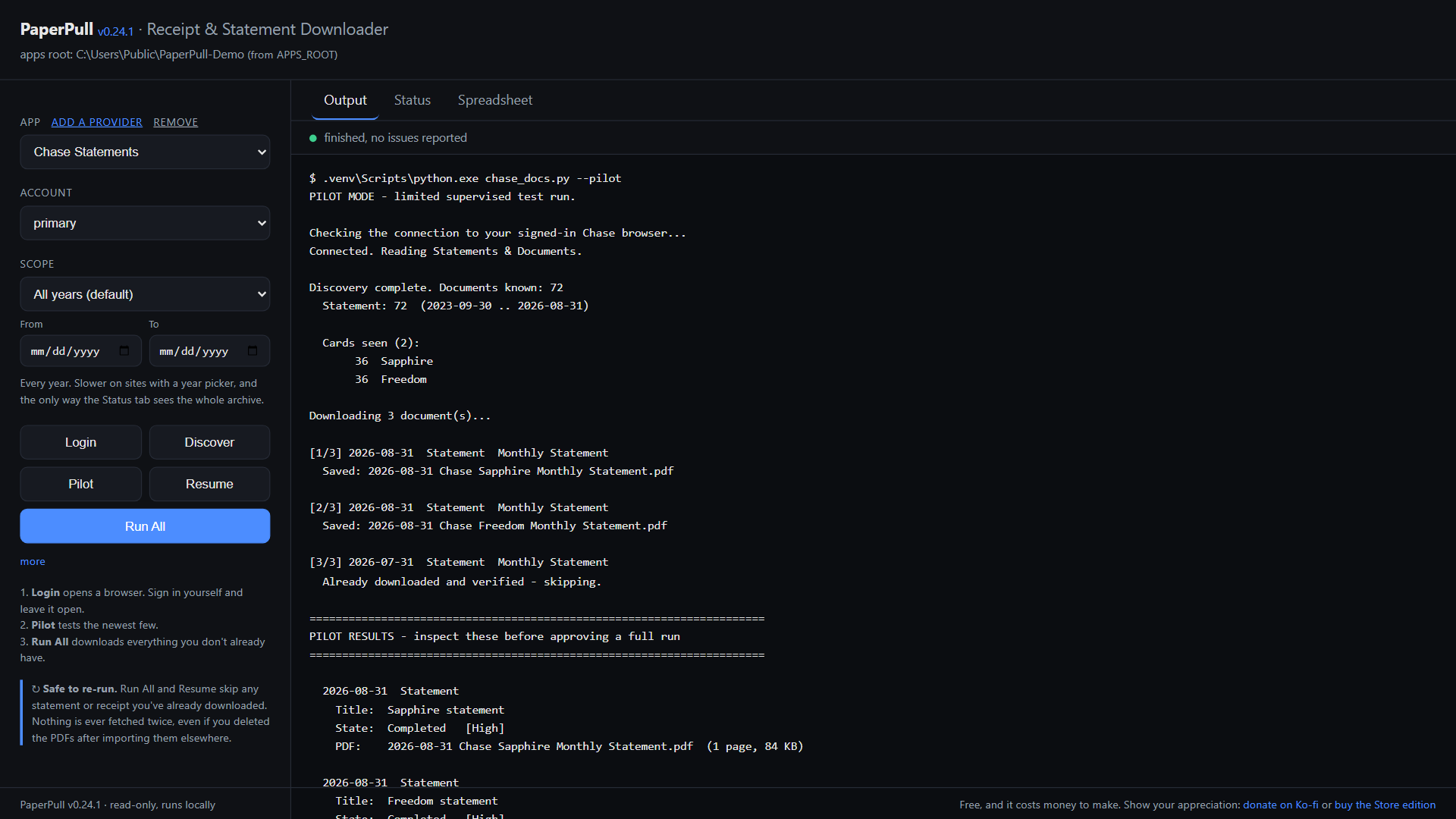
The PaperPull control panel after a pilot run: two Chase statements saved, one skipped as already downloaded, no problems detected.

How it works

You sign in. It reads. Your files land where you said.

There is no PaperPull account and no PaperPull server. The program runs on your computer and talks only to the sites you sign in to.

STEP 1

Sign in yourself

Press Login and a real browser window opens on the provider's own site, with its own profile. You type your password and answer the two-factor prompt. PaperPull never sees either.

STEP 2

It reads, and only reads

PaperPull attaches to that window afterward and reads the document list the way you would. Nothing that pays, transfers, buys, sells or changes a setting is ever clicked. A blocklist of those words guards every click.

STEP 3

Every PDF, filed

Each document is saved as 2026-08-31 Chase Sapphire Monthly Statement.pdf or 2026-07-12 Amazon Groceries Receipt.pdf in a folder you chose. Run it again next month and it fetches only what is new, even if you moved the old files elsewhere.

The Status tab: eleven archives, one marked overdue, one with a gap in the middle of 2025.
The Status tab knows which archive is due, and where a month is missing from the middle.
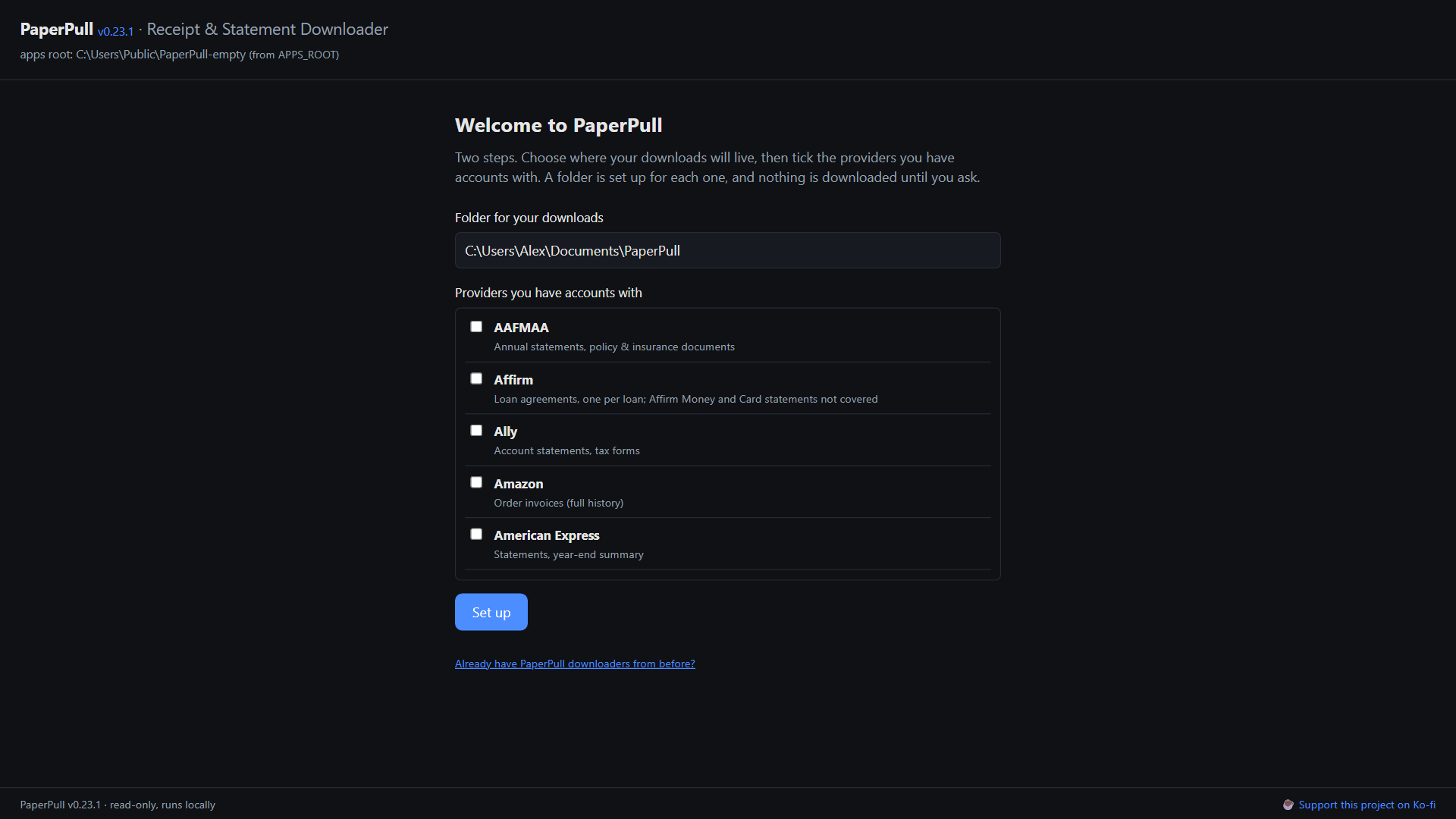
The first-run screen: choose a folder, tick the providers you have accounts with.
First run. Pick a folder, tick your providers, done.

Why not by hand

You could just log in and download them yourself. So what is automated?

For one statement, doing it yourself is faster. PaperPull is for the other case, the whole archive, and then every month after.

The backlog

A bank keeps years of statements behind a card picker, a year dropdown and one download per month, each file landing as statement_20260831.pdf in Downloads. Two cards and seven years is 168 clicks, 168 file dialogs, and an afternoon of renaming. PaperPull walks every card and every year on its own, and names each file 2026-08-31 Chase Sapphire Monthly Statement.pdf as it lands.

Every Amazon order you ever placed

Amazon, Target and Walmart offer no PDF at all. PaperPull opens each order's printable summary, prints it to a PDF named by date and what was in it, and records every line item on the way past, back to your first order. Years of orders in one run, with no download button ever involved.

Thirty-one sites, one panel

Every provider has its own login, its own layout and its own idea of where the documents are. Here each one is the same three buttons, Login, Pilot, Run All, and the same folders on the other side.

Next month, and the one after

Run it again and it fetches only what is new. It remembers what it already saved, even if you moved the PDF into your filing system or deleted it, so the archive stays complete without you keeping a list of what you have.

Knowing what is missing

The Status tab says which archive is due and where a month is missing from the middle of the run. By hand, nobody notices the gap until the day they need that statement.

The transactions, out of the statements

Reading every transaction out of a few hundred statement PDFs into a spreadsheet is the part nobody does by hand. PaperPull does it, and checks each statement against its own printed balances.

Every purchase, in one spreadsheet

Those recorded line items become one table across every store and every account, what you bought, when, for how much, sorted newest first, with an Orders sheet and a Summary of spend by year. Excel can sum it, filter it, and answer what you spent on groceries in 2025.

Providers

Does it do my bank? My card? My Amazon?

Thirty-one today, from Chase to Walmart. Each one is a small, separate app, so when a site changes only that one needs repairing.

Banks and credit unions

AllyCapital OneNavy FederalUSAAU.S. BankM&T Bank (mortgage)

Credit cards

American ExpressChaseDiscoverTarget RedCard / Circle Card

Investing and retirement

FidelityFidelity NetBenefits (401k)Charles SchwabRobinhoodWealthfrontThrift Savings Plan

Pay and benefits

PaylocityUKG ProDFAS myPayAAFMAA

Insurance

Anthem Blue Cross Blue Shield

Utilities and phone

Verizon FiosT-MobileDominion EnergyPG&EFairfax Water

Stores

Amazon (any country)TargetWalmartGapOld NavyBanana RepublicAthletaAffirm

Missing yours? Ask for it, or build it, most take an evening. AT&T is built and waiting for someone with an account to test it. Provider names belong to their owners. PaperPull is not affiliated with any of them.

Spreadsheets

The PDFs become spreadsheets.

Every purchase in one table. Your Amazon, Target and Walmart receipts become one long list of every item you have ever bought, across every store and every account, with what it cost and when. Amounts are numbers, so Excel can sum them, and a Summary sheet totals spend by store and by year.

ProviderDateItemQtyLine totalCategory
Amazon2026-09-16Anker 65W USB-C Charger139.99Electronics
Target2026-09-14Good & Gather Whole Milk 1 gal27.98Groceries
Walmart2026-09-11Dog Food 30 lb138.98Pet Supplies
Amazon2026-09-08Air Filter 16x25x1, 4 pack131.96Household
Target2026-09-02Kids Sneakers124.99Kids

Five rows of a Purchases sheet, made-up data. The real one runs to every order you ever placed.

Every transaction, out of the statement. The lines inside your bank and card statements are read out of the PDFs into a workbook, one row each. Every statement is checked against its own printed beginning and ending balances, and one that does not add up says so, so a row you are looking at is a row that reconciles.

One button on the control panel, or one command. Each PDF is read once and remembered, so the second build takes seconds.
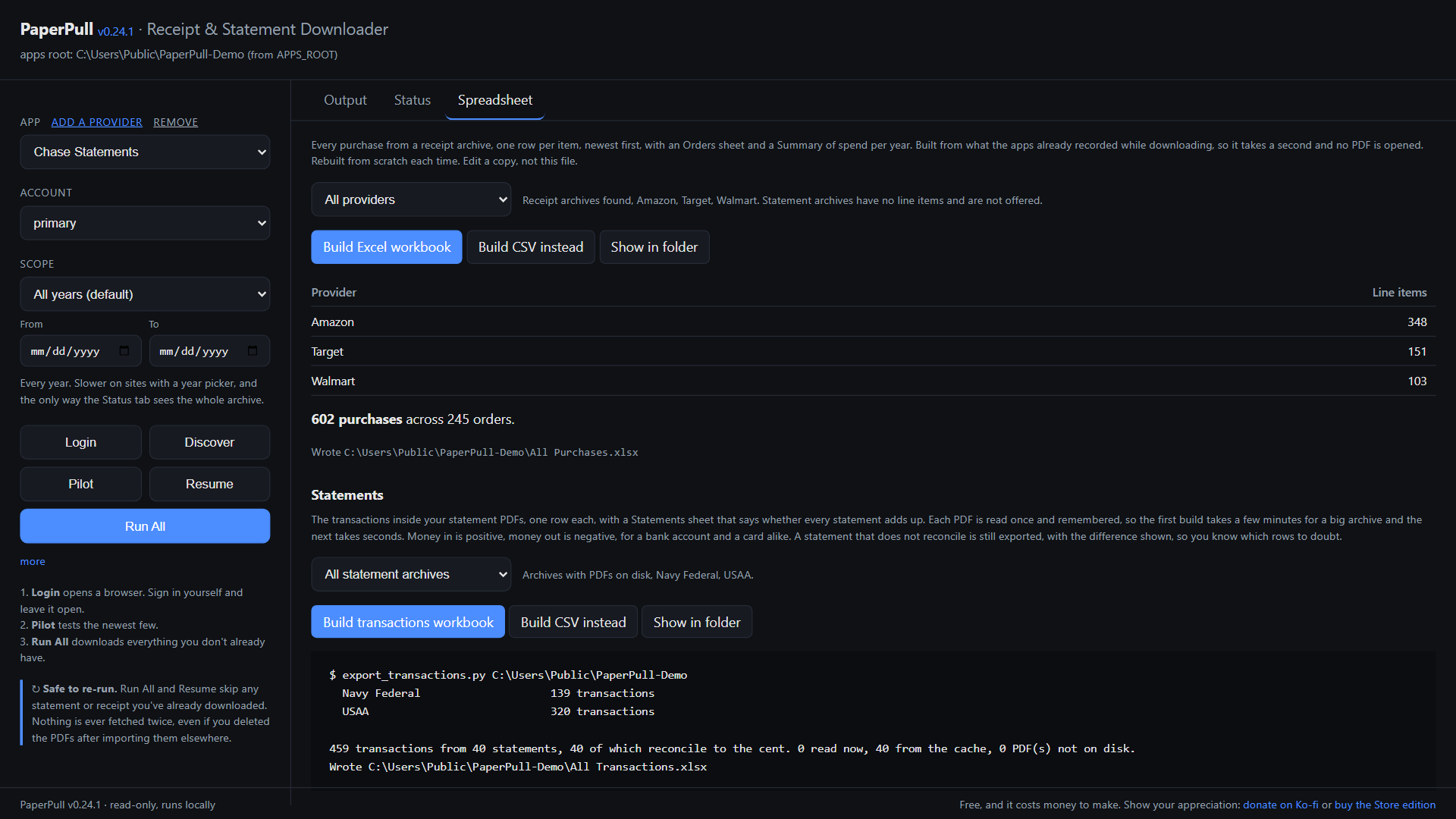
The Spreadsheet tab: 602 purchases across 245 orders, and 459 transactions from 40 statements, all 40 reconciling to the cent.

Safety

Why it is safe to point at your bank, or your Amazon.

A tool that reads your accounts has to earn that. These are the four promises, and every one of them is checkable in the source.

It never has your password

You sign in on the provider's own page, in a real browser. PaperPull attaches afterward and reads. There is nowhere to type a password into PaperPull, so there is nothing for it to store or leak.

Read-only by construction

Every app carries a blocklist of the words a dangerous control would use, pay, transfer, buy, sell, change, and refuses to activate anything that matches. Most providers are read through the site's own API with nothing clicked at all. SECURITY.md says which does what.

Everything stays on your computer

No account, no server, no telemetry, no update check. The control panel is a local page on 127.0.0.1 that only your own browser can reach. The whole privacy policy is one sentence.

Open source, built in the open

AGPL-3.0. Every release is built by GitHub Actions from a tagged commit on a clean runner, with the checksums published by the same run, so the file you download is the code you can read.

Get it

Free to use. Not free to make.

Two editions of the same program, from the same build, and nothing held back from either. One of them, or a coffee, helps cover what it costs.

GitHub release

Free

  • Windows installer and portable zip, macOS on Apple Silicon
  • The Windows installer is not yet code-signed, so SmartScreen asks once
  • Update by running the new installer over the old one
  • Checksums and build logs on every release

Microsoft Store edition

$2.99 one time

  • The same program from the same build
  • Signed by the Store, installs with no warning
  • Updates itself through the Store
  • Uninstalls cleanly, and supports the work
Coming to the Microsoft Store

PaperPull is free, and it costs money to make. The signed Mac build needs an Apple developer membership every year, the Store listing needs a developer account, and every provider takes evenings to build and to keep working as sites change. Nobody is being sold anything. If it saves you time, this is the tip jar.

Buy me a coffee on Ko-fi

Where it came from

Built for one person, then for everyone who asked.

PaperPull started as a fix for one filing cabinet. I used FileThis to pull my statements into my own archive, and when FileThis went away there was nothing to replace it. No service would sign in as me, download years of statements and receipts in one go, and hand them over as plain PDFs I could keep.

So I wrote one, for my own accounts, one provider at a time. As it grew, other people turned out to want the same thing, and the pile of scripts got a name, a control panel and a public repository. It has grown from there, mostly through people who hold accounts I do not, which is the only way a provider ever gets added.

That is also where you come in. Every provider on this page exists because someone with that account tested it. If yours is missing, or a site changed and broke it, open an issue, test a build, or build it yourself, most take an evening. And if it works for you, or does not, I would like to hear that too. Feedback is what keeps this pointed at what people actually need.

Bryan Rhee